
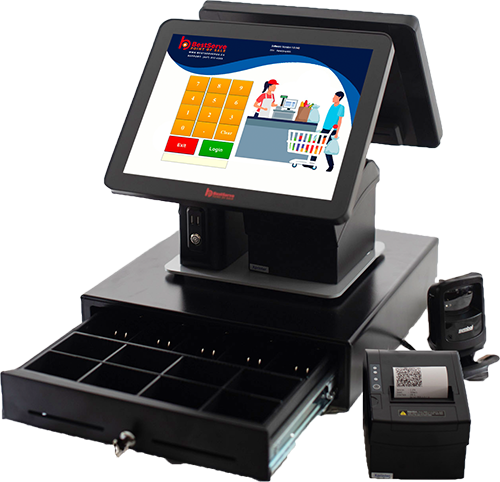
Choosing the right POS system for small business operations is an important decision for Canadian entrepreneurs. Whether you own a restaurant, retail store, café, salon, or convenience store, your point-of-sale system plays a major role in managing daily transactions, tracking sales, and keeping your business organized.
A modern POS system for small business operations does more than process payments. It can help manage inventory, generate sales reports, track employee performance, and improve the overall customer experience. It can help manage inventory, generate sales reports, track employee performance, and improve the overall customer experience. However, with so many systems available, finding the right solution for your business can feel overwhelming.
This guide explains seven important factors to consider when choosing the best POS system for your small business in Canada.
1. Understand Your Business Needs
Before comparing different POS systems, identify the features your business requires. Not every business operates the same way, and the right POS solution should support your specific daily activities.
For example:
- Restaurants and cafés: Need order management, menu customization, kitchen printing, table management, and payment processing.
- Retail stores: Benefit from barcode scanning, inventory tracking, sales reporting, and product management.
- Salons and spas: May require appointment scheduling, employee management, service pricing, and customer records.
- Cell phone stores: Often need serial number tracking, inventory control, repair management, and customer purchase histories.
- Convenience stores: Typically require quick checkout, barcode scanning, product pricing, and inventory management.
Choosing a POS system designed for your industry can help simplify daily operations and reduce the need for additional software. For example, BestServe POS provides customizable POS solutions for different business types, allowing owners to choose features that fit their operations.
2. Look for an Easy-to-Use POS System
A complicated POS system can slow down transactions, increase employee training time, and create unnecessary challenges during busy hours.
When choosing a POS system for small business, look for software with a simple interface that employees can learn quickly.
Important usability features include:
- Easy-to-navigate touchscreen menus
- Fast product searches and checkout
- Simple payment processing
- Quick access to sales reports
- Straightforward inventory updates
- Easy employee training
An intuitive POS system for small business operations can help employees complete transactions efficiently while allowing business owners to focus on customer service.
For restaurants, an easy-to-use ordering interface is particularly important during busy lunch and dinner periods. Retail stores also benefit from fast barcode scanning and simplified checkout procedures.
Before purchasing, request a demonstration to see how the system performs during everyday business activities.
3. Compare POS System Costs and Fees
Cost is one of the most important considerations when selecting a POS system for small business owners in Canada. Understanding upfront expenses and ongoing fees can help you choose a solution that fits your budget.
Some POS providers charge monthly software subscription fees, while others offer systems without recurring software fees.
Before making a purchase, understand the complete cost of ownership.
Common POS System Expenses
- Hardware costs: POS terminals, cash drawers, receipt printers, and barcode scanners.
- Software fees: Monthly or annual subscriptions, where applicable.
- Payment processing fees: Charges associated with debit and credit card transactions.
- Installation and setup: Costs for configuring the POS system.
- Maintenance and support: Additional charges for technical assistance or updates, if applicable.
- Additional features: Optional integrations, modules, or services.
A POS system with a lower initial price may become more expensive over time if it includes ongoing subscriptions or additional service fees.
BestServe POS offers customizable point-of-sale software with no monthly software fees and no contracts, making it an option worth considering for Canadian businesses that want to manage recurring software expenses.
When comparing providers, always request a detailed quote that explains what is included and whether additional charges apply.
4. Choose a POS System With Inventory Management
Inventory management is an important feature when choosing a POS system for small business operations, particularly for retail stores, convenience stores, and restaurants.
Without an organized inventory system, businesses may struggle to track stock levels, identify popular products, or determine when new inventory is needed.
A POS system with inventory management can help business owners:
- Track product quantities and stock movement
- Monitor best-selling products
- Identify slow-moving inventory
- Update product pricing
- Organize products by category
- Reduce manual recordkeeping
For example, a convenience store owner can use inventory reports to understand which products sell most frequently. A retail store can review stock movement to make more informed purchasing decisions.
When evaluating inventory features, consider whether your business needs barcode scanning, multiple locations, supplier tracking, or product variations such as size and colour.
The right inventory tools can help reduce administrative work and support better purchasing decisions.
5. Check Payment Processing and Canadian Tax Features
Canadian businesses need a POS system that can support their payment methods and applicable sales tax requirements.
Customers may prefer different payment options, including cash, debit cards, credit cards, and contactless payments.
Before selecting a POS provider, verify that the system works with your preferred payment terminal and payment processor.
Important payment features to consider include:
- Cash and card payment options
- Compatible debit and credit card terminals
- Contactless payment support through compatible hardware
- Split payments and refunds
- Accurate receipt generation
- Applicable GST, HST, PST, or QST configuration
Canadian businesses should also consider how a POS system handles sales tax calculations and transaction records.
For instance, a restaurant in Ontario may need to apply HST to applicable sales, while businesses operating in other provinces may have different tax requirements.
A properly configured POS system can help calculate applicable taxes and maintain transaction records that support bookkeeping and tax reporting.
6. Review Reporting and Business Management Features
A reliable POS system for small business management should help owners understand their performance, not just complete transactions.
Sales reports provide useful information about revenue, product demand, employee performance, and purchasing trends.
Look for a system that offers reporting features such as:
- Daily, weekly, and monthly sales summaries
- Product sales reports
- Employee sales tracking
- Payment method breakdowns
- Sales trends and historical comparisons
- Inventory reports
For example, a café owner might discover that certain beverages sell better during morning hours, while a retail business may identify its strongest-selling product categories.
These insights can help businesses make more informed decisions about staffing, pricing, promotions, and inventory purchasing.
BestServe’s Restaurant POS System includes reporting capabilities designed to help restaurant owners monitor sales, employee activity, and daily business performance.
7. Consider Customer Support and Future Growth
Reliable customer support is an important factor when choosing a POS system.
Technical issues can interrupt transactions, delay service, and affect customer satisfaction. Having access to knowledgeable support can help businesses resolve problems and keep operations running.
Before purchasing, ask the POS provider:
- What technical support options are available?
- Are installation and employee training provided?
- Are software updates included?
- Can additional hardware be connected later?
- Can the system support business expansion?
- Are there extra charges for maintenance or assistance?
Your POS needs may also change as your business grows.
A small café might eventually introduce online ordering, while a retail store may add more checkout terminals or expand to another location.
Choosing a customizable POS solution can make it easier to adapt to changing business requirements.
BestServe POS provides locally supported POS solutions for Canadian businesses, with hardware and software options designed for different industries.
Why Consider BestServe POS for Your Small Business?
Finding the best POS system for small business operations means choosing a solution that balances functionality, affordability, and dependable support.
At BestServe POS, we provide customizable point-of-sale solutions designed to help Canadian businesses simplify daily operations.
Our POS solutions offer:
- Easy-to-use and customizable software
- No monthly software fees or contracts
- POS terminals and compatible hardware
- Sales reporting and business management tools
- Inventory management capabilities
- Payment terminal integration options
- Solutions for restaurants, retailers, salons, and cell phone stores
- Dedicated local customer support
Whether you are opening your first business or upgrading an existing checkout system, having the right POS technology can help you operate more efficiently.
Explore our POS solutions to discover options for your business.
Choosing the best POS system for small business owners in Canada requires more than comparing prices. It involves finding a solution that supports daily operations, customer service, and future growth. The right system should be easy to operate, support your preferred payment methods, provide useful business reports, and offer features relevant to your industry. By evaluating your business requirements, software costs, inventory management tools, and customer support options, you can make a more informed purchasing decision. Investing in a suitable POS system can help streamline daily operations, improve customer service, and support long-term business growth.
Ready to Upgrade Your POS System?
BestServe POS offers customizable point-of-sale solutions for Canadian restaurants, retail stores, salons, and other small businesses.
Visit BestServe POS or call (905) 649-9191 to learn more about our systems and request a demonstration.